Showing posts with label design. Show all posts

November 26, 2010

Grad Invitations

These invitations were commissioned from a friend. I promised I'd post up a work in progress and here it is. :3


Epic workplace of epic mess. Epic.


Templates. The paper one died not long after the first 10 or so, so I moved onto a cardboard one.


After drawing in the tempate I added all the necessary measurement marks and scored the fold lines with a semi-dulled awl, then got to cutting the sleeves out.

Cutting. More cutting. o_O


One change of blade-tip later and all sleeves are done. :)


I have scraps coming out of my ears! Time to wash hands of green before starting on the next step. But first...


:3


All set and ready to assemble. The text part of the invitations themselves were designed, printed, sealed, cut and assembled by me earlier.

Envelopes were designed, cut and scored out of lovely metallic, patterned paper which I turned the pattern to the inside. The corresponding designs go on the outside to match up with the invites.

Envelopes where then separated into their designs, then matched up with their invites all ready and folded up.

DONE! Added some matching sticker seals made with my trusty sticker maker and packed them up neatly ready to be mailed. :D


*


July 22, 2010

Some July Works-In-Progress

We're currently in the middle of a major renovation of our current home while looking for a new place to live. My life is currently a mess of rather large proportions with packing, painting, house hunting and constant CONSTANT driving which is, frankly, driving me a little nuts!
I thought, with the untimely demise of my day job, I'd have more time to pursue my creative passions... this is infuriatingly not so :(
Ah well, I'm still managing to chip away at a few current art and binding projects, here's a peek.

Book binding:


Arts:
(vector work for now, as I only had photoshop open and it doesn't open painter files :/ )


*

May 17, 2010

Printable - Cardigan Dolly Stationary

Printable JPG.
A cute little stationary sheet to jot down cute little notes. ^_^


Feel free to save to your computer or print for personal use. :)
p.s. If you'd like a higher resolution, lemme know here.

*

March 10, 2010

Up To No Good


A daily that turned into a finished image again, i never realised how easy it is to get carried away with vectors. :p
I initially wanted to do a portrait of some kind but when I got started it became more and more stylised, so I just pushed that further until you have this. :)

I recently purchased a fashion and costume book from the Kyoto Costume Institute and I've been ogling the gorgeous styles, craftsmanship, fabrics and the whole opulence of, in particular, 18th and 19th century fashion. As I moved through the fashionable ages, I noticed, however, a distinct lack in the 1920's section and a sad lacking of the lovely flapper style I admire, so I threw in some of that deco influence here as well, to make up for it in my mind. :p


Hmm. I can't decide whether I feel this one is right for Red Bubble gallery or not, any thoughts please?

Also cross posted to my Daily365 blog.


*

March 9, 2010

Palest Doll WIP


A work in progress again, once finished it's going up on my Red Bubble account. :)
Vector illustration of a doll since it's become my recurring theme these days ^^'
I'm having some issue with the background colours though, i'm just not sure it's working... any feedback would be greatly appreciated there.


*

March 7, 2010

New Dolly WIP - Cardigan Girl


A work in progress that began as a Daily on my Daily365 blog.
Drawn in Illustrator.
I've slapped down some colour for now but i don't know if i'll keep them as i'm planning to colour her in Painter rather than in vectors. However, with my current passion for vector I may end up colouring her there anyway lol. We'll see.

Now, her face.
I would have had this up sooner except I couldn't for the life of me get her face right, something about the angle and the style I was aiming for and it just didn't want to turn out.
I must have reworked and reworked and reworked that face way too many times and I'm still not sure I'm happy with it. Sigh.
I am, however, happy with her outfit, particularly her legs, which means it wasn't a total waste of time after all ^_^.


*

March 4, 2010

Rapture in Red


Another finished image yay!
More vector art. If it wasn't obvious by now, red is my favourite colour.
I'm rather fond of the strange, symbolic feel to this one. I was going for a classical look to her features, which was pretty much the only thing that remained from the initial design... the difference from what this could have been is actually quite laughable. If anybody asks, I'll post the initial vector sketches at my own humiliating expense :p
This image is also on it's way to becoming a print on Red Bubble.

*

February 26, 2010

Classical Dolly


Another Dolly in vectors :p
This time a somewhat classical, coy girl, the details in the outfit might not be historically/realistically correct but I don't really care, she's a dolly, she doesn't have to be realistic :3 (another reason why I love making them).
She is also unfinished, I'm yet to add shading and such.


*

February 8, 2010

Grungy Notepad Tutorial and Printout

Day 21 of my 365 Design a Day, I created this little vectored printout project: To make your own grungy little notepad!
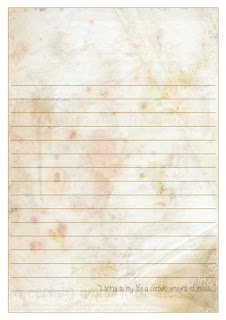

Get the download here: Notepad Pages PDF

The design was created in illustrator (so still vectors!) using a few grunge and dirt brushes and a texture background as well as various layer blending effects.

Free to download and print out for personal use only. :)


Mini Instructions:
1. Click on the link, download the PDF file to your computer, open it, print it out onto A4 or Letter size paper (may need a little resizing) of a decent weight/thickness and not too opaque; I used an 80GSM weight, smooth paper. Regular printer paper works fine.
2. Print out more than one page, say, between 10 and 20 (5 or 10 double pages), depending on the weight of the paper (lighter/thinner paper = more pages can be bound together, thicker/heavier paper = fewer can be bound together as it becomes much more difficult to either punch holes or staple).
2. Trim if you prefer not to have the white borders showing.
3. "Bind" the pages together at the top section using a hole punch and strong thread/ribbon or staples.
4. Cover the binding with sticker paper or fabric of choice.
5. Enjoy your new notepad! :D


Photo Tutorial:
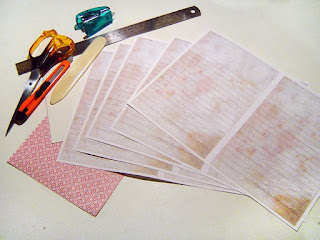

Gather your materials, here I have my printouts (I printed 9 pages so that's 18 sheets in my notepad, for more printing info, check the mini instructions above), a piece of recycled cardboard for the backing, sticky backed patterned paper for the upper wrap and tools of choice.
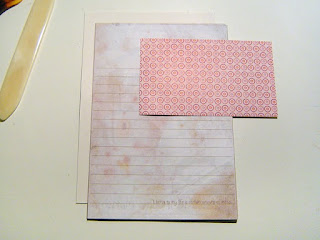
Trim your printouts to your desired size, here I've cut all the white out but you can leave it in if you like a border around each sheet.
Cut your backing card to the same size as your printouts.
Cut your sticker paper or fabric etc to the same width as the printouts and between 8 and 10cm high. You can easily measure how much you want to use, however, by putting the paper against the top margin of the printouts and roughly measuring and marking how far down you'd like the paper to go. Just remember to leave enough to wrap over the block of printouts and down the the back a little.
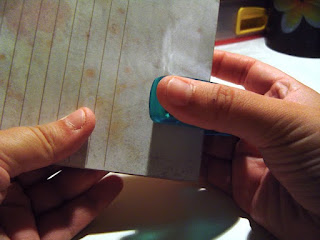
Gather your printed sheets and backing card together and jog them a bit to get them as aligned as possible.
Staple about halfway down the top margin on the printouts - Make sure your stapler is strong enough to staple cleanly through all your papers and card.
Another method here is to punch two holes halfway down the top margin and tie a ribbon or heavy thread through the gathered sheets. The next step is optional if you chose the hole punching method as your ribbon may make too much bulk for the covering sticker paper/fabric.
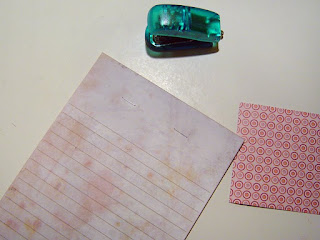
Stapled block of sheets and card backing!
Covering sticker paper ready to be attached.
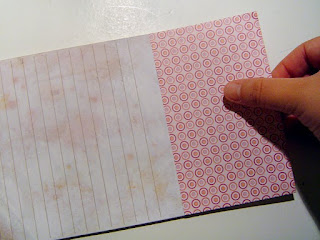
Remove the backing paper from the sticker paper and carefully align it with the sides of the bookblock (your block of printed sheets and card), a little over halfway down and covering the staples, just make sure you have enough of the sticker paper to wrap around the top and attach to the card at the back, as in the next photo.
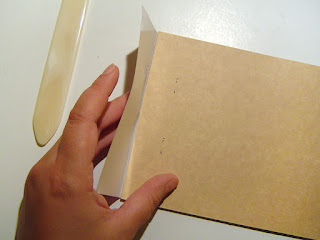
Turn your block over and using a bone folder to help with the crease, pull the sticker paper over the top of the block and down to stick to the card backing.
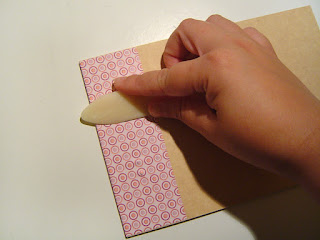
Use a bonefolder or equivalent to apply pressure, carefully! or you might tear the paper where the staples are.
Smooth out creases and press the sticker paper firmly to the front and back of the block of sheets.
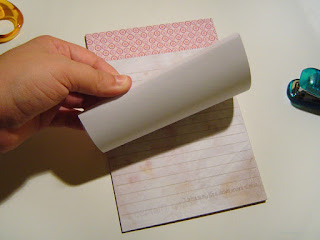
Enjoy your new notepad!
An easy little project under 30 minutes. :D


Cross posted to my 365 Days of Vee Blog also.

*

January 19, 2010

365 Days of Design

I'm committing to Smashing Mag's "Design Something Every Day" Challenge.
I've been sorely slacking off on my design and illustration work lately, so any motivation, especially something as fun as this, is well received.
Most people started on the 1st of Jan, I, as usual, was late to the party and have only started today... or yesterday if my clock is correct (which it is, it's past midnight and why am I not in bed yet??).

I've dedicated a blog to this most auspicious event: 365 Days of Vee
:P

First post is up there already, a quick little vector intended as a Valentines card piece but which is now a printable for your personal use pleasure (just let me know if you'd like a higher res version).

And that, my dears, is the first blog post of 2010!! :D


Dearlawd, what am I getting myself in to! XD


*

Other Relevant Links

LinkWithin Related Stories Widget for Blogs